





Namespace in PHP:-
Namespace concept isn’t any new for programmers coming from c++, java, python or ruby platform. They are a way of encapsulating classes. You could compare it with package in other programming language, which contains several classes.
Advantages of PHP Namespaces:-
- Prevents class collisions of different libraries.
- Allow to use class alias to make code more readable.
Defining and importing Namespaces in PHP.
namespace DB;
// here DB is declared as namespace any code come below will be encapsulated by it.
They can be separated by forward slashes.
namespace \FRAMEWORK\DB\MODELS;
// but it doesn't mean class DB must reside inside  FRAMEWORK namespace.
Now to use it,
use \FRAMEWORK\DB\MODELS as model;
// to import namespace in your application.
Example:- code readability with namespaces
use \DB\MySQL as mysql;

/**
* Creating a new database connection.
* new mysql() creates new Object
*/
$link = new mysql(array(
		'host' => 'localhost',
		'database' => 'curd',
		'username' => 'root',
		'password' => ''
		));

$DB = $link->getConnection()->connectDB();

$users = $DB->query("select * from users")->fetch();
See the database table structure for above code.
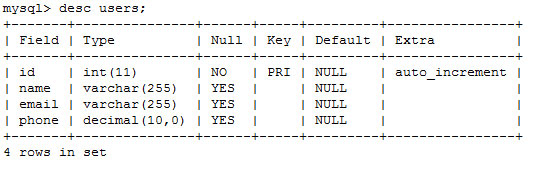
Using namespace in PHP code
We’ll have following file structure to arrange the namespace.
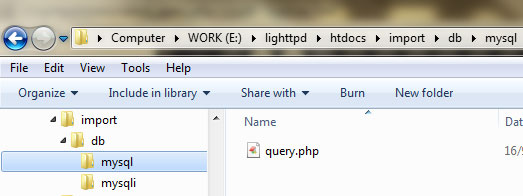
/demo.php
/config.php
/import/
/import/db.php
/import/db/
/import/db/mysql.php
/import/db/mysql/
/import/db/mysql/query.php
Make config file with global configuration:-
//File Location: /config.php

define("NAMESPACE_DIR",'import');

function __autoload($class) {
$parts = explode("\\", $class);
$filepath = implode(DIRECTORY_SEPARATOR,$parts);
$filepath = strtolower(NAMESPACE_DIR.DIRECTORY_SEPARATOR.$filepath.'.php');
require $filepath;
}

$DB_SETTINGS = array(
	'host' => 'localhost',
	'database' => 'curd',
	'username' => 'root',
	'password' => ''
);

global $DB_SETTINGS;
- Above code makes default setting for database connection.
- we made __autoload() function to specify php how it should load class files.
- In our example __autoload() function looks into directory “import”.
- Then every namespace would be store as separate directory.
- classes within that namespace will be stored inside namespace directory.
Example, see following code
use \DB\MySQL as mysql;
___autoload() will look for file into following location.
/import/db/mysql/mysql.php
Revisiting basic mysql functions
| Function Name | Description |
|---|---|
| mysql_connect(‘HOSTNAME’,’USER’,’PASSWORD’); | Connects to mysql server. |
| mysql_select_db(‘DATABASE’); | Select database from mysql |
| mysql_query(‘SQL’) | Does SQL manipulations |
| mysql_fetch_row / mysql_fetch_array / mysql_fetch_assoc | Gets SQL results into array. |
| mysql_close() | Closes Database Connection |
Create mysql class into DB package
//File Location: /import/db/mysql.php

namespace DB;

class MySQL{

protected $host;
protected $database;
protected $username;
protected $password;
private $resource_id;
public $connection = NULL;

function __construct($settings = array()) {
                $this->host          = $settings['host'];
		$this->database 	= $settings['database'];
		$this->username 	= $settings['username'];
		$this->password 	= $settings['password'];
                /**
                * if connection already created just return resource_id
                * else create new one
                */
		if( is_null($this->connection) ) {
			$this->getConnection()->connectDB();
		}

		return $this->connection;
	}

	function __destruct() {
		@mysql_close($this->connection);
	}

	public function getConnection(){
/**
* Native php function to create db_connection
*/
	$this->connection = @mysql_connect(
				$this->host,
				$this->username,
				$this->password
		);

		if(!$this->connection) {
			die("Unable to create connection, Server might be too busy or check your credentials!");
		}

		return $this;
	}

	public function connectDB() {
/**
* Native php function to select database
*/
		if(mysql_select_db($this->database,$this->connection)){
			return $this;
		} else {
			die("Unable to connect to database");
		}
	}

}
Create query class into MySQL package
//File Location: /import/db/mysql/query.php

namespace DB\Mysql;
use DB\Mysql as mysql;

class Query extends mysql{

private $resource_id;
private $record_set;

function __construct( $sql ){
  global $DB_SETTINGS;
  $this->record_set = Array();
		$this->resource_id = parent::__construct($DB_SETTINGS);
		$this->query($sql);
	}

	public function query($sql) {
			$this->resource_id = mysql_query($sql,$this->connection);
			if(!$this->resource_id){
				echo (mysql_error());
				return null;
			}
			return $this;
	}

	public function fetch() {
			$record_set = Array();
			while($row = mysql_fetch_assoc($this->resource_id)) {
				$record_set[] = $row;
			}
			return $record_set;
	}
}
Creating demo.php file
// File Location: /demo.php

require("config.php");

use DB\MySQL\Query as query;

$users = new query("select * from users");
$all_users = $users->fetch();

foreach ($all_users as $user):
         print $user['name'] . "  ";
         print $user['email'] . "";
endforeach;
You could download sample working code here. In upcoming post I’ll explain how to plug mysqli class to this DB package without changing core business logic.

Full Stack Software Engineer | AI Author – Credentials
Experience: 20+ Years in Software Development
Credentials: B.E. Computer, SVNIT Surat (2004)