




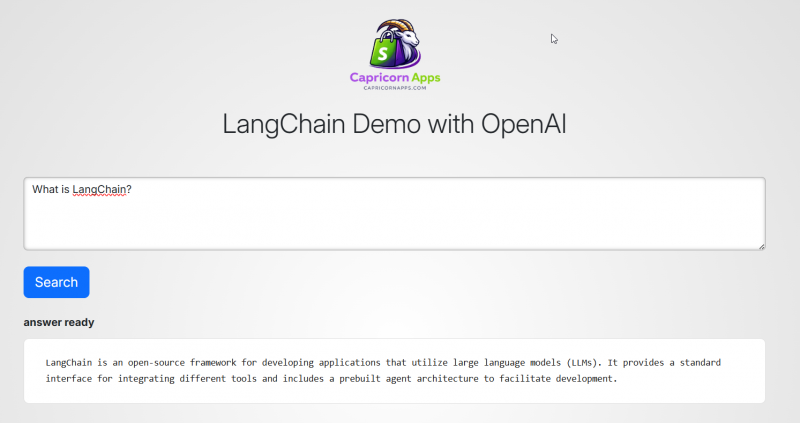
Recently I built a small experimental AI search application to better understand how modern AI assistants work internally.
Instead of relying on abstractions or frameworks alone, I wanted to implement the entire flow myself:
- user query
- tool usage
- reasoning
- token streaming
- frontend updates in real time
The project uses FastAPI, LangChain, and Server-Sent Events (SSE) to stream responses directly to the browser.
The repository is public, and sensitive credentials are stored in .env, which is excluded from version control via .gitignore.
The Initial Version
The first working version was extremely simple.
Everything lived in a single Python file. Even the HTML frontend was embedded inside Python strings.
Example:
return f"""
<html>
  ...
</html>
"""
It worked, but it quickly became messy.
Frontend structure, styling, scripts, and backend logic were all mixed together.
At that point the code was functioning but not maintainable.
Core Architecture
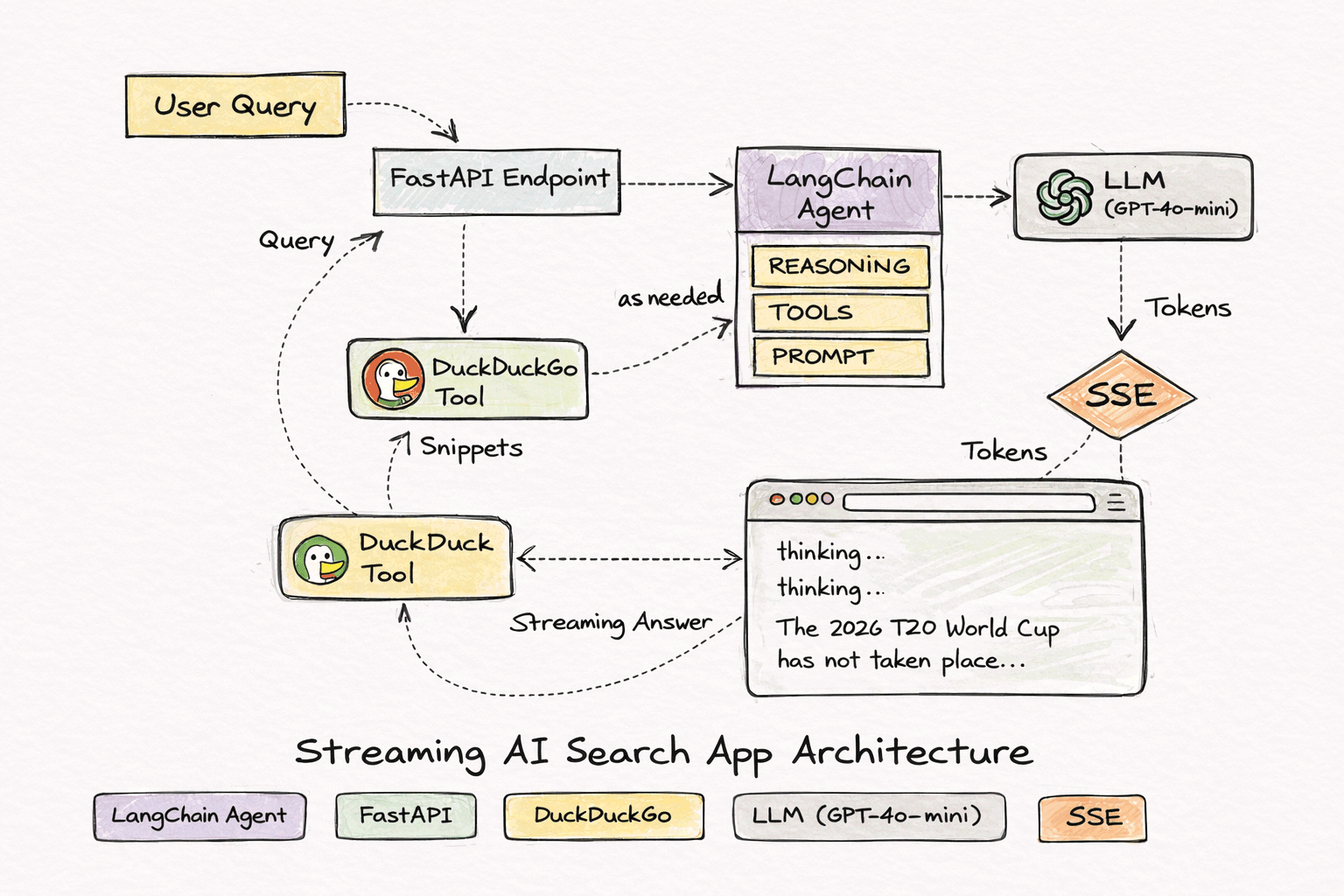
The system pipeline looks like this:
User query
   ↓
FastAPI endpoint
   ↓
LangChain agent
   ↓
DuckDuckGo search tool
   ↓
LLM reasoning
   ↓
Streaming answer
   ↓
Browser UI
The agent follows a ReAct reasoning pattern.
Typical execution looks like this in the logs:
Thought
Action: DuckDuckGoSearch
Observation
Thought
Action: DuckDuckGoSearch
Observation
Final Answer
This allows the LLM to decide when it needs external information.
Streaming Responses
Instead of waiting for the full response, the server streams tokens as they are generated.
The backend emits SSE events such as:
event: status
data: thinking...

event: status
data: searching DuckDuckGo...

event: token
data: The

event: token
data: 2026

event: done
data: completed
The browser listens to these events using:
const source = new EventSource("/stream?query=" + encodeURIComponent(query))
Each token is appended to the result area in real time.
This produces the same streaming experience users see in modern AI tools.
Handling Async + Threads
One of the more interesting issues appeared when the search tool ran inside a worker thread.
The error looked like this:
There is no current event loop in thread 'ThreadPoolExecutor'
This happened because the tool attempted to use the asyncio event loop from a different thread.
The fix was scheduling updates back to the main event loop using:
asyncio.run_coroutine_threadsafe(queue.put(...), loop)
This allowed the background tool execution to safely send updates to the SSE stream.
Separating the Frontend
After the backend stabilized, I moved all HTML into Jinja templates.
Instead of returning raw HTML strings, FastAPI now renders templates.
Project structure became:
app/
 ├ templates/
 │   ├ base.html
 │   └ index.html
 ├ static/
 └ main.py
FastAPI renders the page like this:
templates.TemplateResponse(
    "index.html",
    {"request": request}
)
This change cleaned up the backend significantly.
Python now focuses only on the AI pipeline, while the UI lives where it belongs.
UI Improvements
The frontend includes a small animated status indicator showing the system state:
routing question...
thinking...
searching DuckDuckGo...
generating answer...
The animation uses a lightweight CSS loader for the trailing dots.
This makes the streaming behavior clearer for users.
Observations from the Experiment
Building the system revealed a few useful lessons.
Tool quality matters
The LLM can only reason over the data it receives.
The DuckDuckGo API sometimes returns irrelevant snippets, which limits answer quality.
The model itself isn’t the bottleneck.
Streaming changes the user experience
Even if the model takes several seconds to finish, streaming tokens keeps the interface responsive.
This pattern is now standard across AI tools.
Agents need limits
Without limits, the ReAct loop may keep searching repeatedly.
Constraining iterations prevents unnecessary tool calls.
Debug visibility is critical
Watching the reasoning process in logs makes it much easier to understand why the agent produced a particular answer.
Current State
The application now includes:
- FastAPI backend
- SSE token streaming
- LangChain agent with tool usage
- DuckDuckGo search integration
- Jinja template frontend
- animated UI state indicators
- environment-based configuration
While the project itself is small, the architecture reflects the same design patterns used by modern AI assistants that combine language models with external tools.
Source Code : https://github.com/vikaskbh/langchain-fastapi

Full Stack Software Engineer | AI Author – Credentials
Experience: 20+ Years in Software Development
Credentials: B.E. Computer, SVNIT Surat (2004)